Door Hanger Templates: Your Key to Professional Door Signs
More Than Just a Piece of Paper
Ever walked up to an office door and seen a hastily scribbled "In a Meeting - Do Not Disturb" note taped to the glass? It works, but it doesn't exactly scream professionalism or brand consistency. This is where a well-designed solution comes into play. A door hanger template is a pre-designed, formatted file that gives you the exact layout, dimensions, and structure needed to create a polished, uniform sign. It’s not just about conveying a message; it’s about controlling the environment and ensuring every touchpoint in your space reflects a cohesive brand identity. By using a template, you move from makeshift notes to intentional, professional communication.
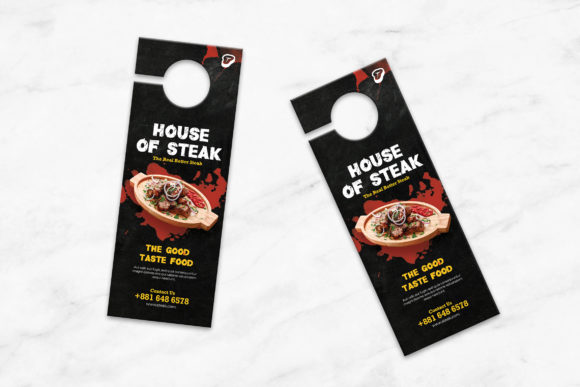
Think of these templates as foundational design assets. They eliminate the guesswork of sizing, bleed areas, and safe zones, which are crucial for print production. The provided specifications—like a print size of 4.5×11.25 inches with a final trim size of 4.25×11 inches and 0.25-inch bleeds—mean the file is genuinely print ready. You’re not just getting a pretty picture; you’re getting a technically sound file prepared for commercial printing. This attention to detail is what separates a DIY project from a professional outcome, ensuring clean edges and perfect alignment every time.
The Anatomy of a Practical Template
When you download a set of door hanger templates, you’re investing in a toolkit. The inclusion of both PSD and JPG files is a practical consideration. The layered, grouped PSD file is your powerhouse for customization. As a designer or business owner, you can dive into the layers, change colors to match your brand identity, swap out placeholder text, and even integrate your own logo design. The JPG file, on the other hand, serves as a quick reference or a base for those who might be using simpler editing software. The CMYK color mode and 300 DPI resolution are non-negotiable for quality print output, ensuring your colors are vibrant and your text is crisp, not pixelated.
The real value of these templates lies in their adaptability. They are a starting point for a wide range of applications. A creative agency might use them to design stylish "Do Not Disturb" signs for their studio, reinforcing their modern aesthetic. A hotel could customize them for room service or privacy notices, maintaining a consistent guest experience. Even a home-based entrepreneur can use them for their home office, adding a layer of professionalism when meeting with clients or filming content. The template provides the structure, but your customization gives it personality and purpose, turning a generic file into a key piece of your operational toolkit.
Strategic Uses Beyond the Office Door
The application of door hanger templates extends far beyond simple "busy" or "available" signs. For marketing and entrepreneurs, they become a direct, tactile form of advertising. Imagine a local bakery creating door hangers to hang on nearby residential doors, announcing a weekend special with a QR code for online ordering. This leverages the template's physical format for hyper-local outreach. For publishers and content creators, a customized door hanger can be a fun, branded piece of merchandise or a promotional item for a book launch or studio opening.
From a brand strategy perspective, consistency is king. Using a uniform template across all internal signage—conference rooms, private offices, common areas—builds a subtle but powerful sense of order and professionalism. It influences how employees and visitors perceive your space. The visual hierarchy within the template design guides the eye effectively, ensuring the most important information (like "Meeting in Progress") is immediately readable. This isn't just about aesthetics; it's about clear communication and operational efficiency, preventing interruptions and managing expectations seamlessly.
Choosing and Implementing Your Template
Not all templates are created equal. When selecting a door hanger template set, evaluate the design's personality. Does it have a modern typography feel that aligns with your brand, or is it more traditional? Look at the included styles—some sets might offer variations with different visual weights or graphical elements. Consider the font pairing showcased in the preview; while you can change it, a well-paired example gives you a sense of the designer's intent and can save you time. Always check the licensing to ensure it covers your intended use, especially for commercial projects.
Practical implementation is straightforward. Open the PSD file in Adobe Photoshop. Use the grouped layers to isolate elements you want to change. The background, text elements, and graphic components should be on separate layers, making edits non-destructive. Replace the placeholder text with your specific messaging. Adjust colors using your brand's hex codes or CMYK values for consistency. Before sending to print, double-check that no critical information sits in the bleed zone. The final step is exporting a high-resolution PDF or the appropriate print-ready file format, ensuring all fonts are outlined or embedded. This process transforms a static template into a dynamic, functional piece of your professional environment.