Design Custom Party Decor: Paper Plates Canva Templates
Creating a cohesive, professional look for a party, wedding, or brand event often hinges on the small details. Paper plates, charger inserts, and custom labels are no longer just functional items; they are integral parts of your visual presentation. With the right Paper Plates Canva Templates, you can move beyond generic, store-bought designs and craft pieces that perfectly match your theme, color palette, and personal or brand identity.
What Are Paper Plates Canva Templates?
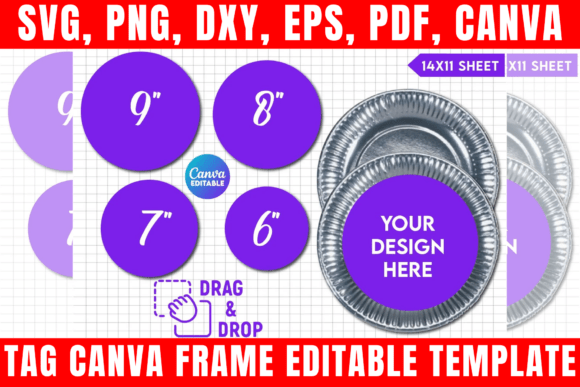
Think of this as a complete design asset bundle for your table setting. It’s not just a single image; it’s an editable ecosystem. At its core, you receive a Canva template link, which is a pre-designed, layered file you can open directly in the free (or Pro) version of Canva. This means you can change colors, edit text, add your own logos or monograms, and adjust sizing without needing advanced software like Photoshop.
The bundle typically includes more than just the Canva file. You’ll find SVG files for precise cutting machines like Cricut and Silhouette, PNG files with transparent backgrounds for digital mockups or other design work, and DXF and PDF files for broader compatibility. The visual style of these templates is often clean and versatile—think elegant script fonts for weddings, playful handwritten fonts for kids’ parties, or modern sans serif typography for corporate events. The "personality" is defined by you during the customization process.
Practical Applications: From Personal Crafts to Business Branding
The true value of these templates lies in their flexibility. For a small business owner or entrepreneur, they are a game-changer for branding. Imagine hosting a product launch or a pop-up shop. Using these templates, you can create round charger inserts that feature your brand’s logo and color scheme, turning every plate into a subtle marketing tool. The blank labels are perfect for customizing favor boxes or creating name tags that align with your brand identity, ensuring a consistent and professional appearance that impresses clients and partners.
For event planners, bloggers, and content creators, these templates streamline the creative process. Instead of spending hours designing from scratch, you start with a professionally sized foundation. You can quickly produce matching sets for a styled photoshoot, a tutorial video, or a blog post about DIY party planning. The included SVG and DXF files mean your digital designs can be seamlessly translated into physical, die-cut products using a home cutting machine, bridging the gap between digital design and tangible craft.
Even for personal use, the impact is significant. Hosting a milestone birthday, baby shower, or holiday dinner becomes more special with personalized touches. The templates allow you to incorporate specific themes, inside jokes, or family motifs that store-bought items simply can’t offer. This level of customization elevates the guest experience and makes the event feel thoughtfully curated.
Key Features and How to Use Them Effectively
Understanding what’s included in the bundle helps you maximize its potential. The editable Canva template link is your primary workspace. It’s here you’ll apply your modern typography choices, test font pairings between a bold display font and a readable body text, and experiment with color. The key is to use Canva’s layers and grouping features to keep your design organized.
The SVG file is crucial for crafters. When using a machine like a Cricut, if the imported dimensions seem off, the solution is straightforward: use the measurement specifications provided with the template to manually adjust the size in your cutting software (like Cricut Design Space or Silhouette Studio). This ensures your physical cutouts are perfectly proportioned.
The PNG file with a transparent background is incredibly useful beyond plate design. You can use it to create mockups for your online store, incorporate the plate design into a larger digital collage, or use it as an element in social media graphics. The PDF file with a solid background is ideal for high-quality printing if you prefer to send your designs to a professional print shop.
Making the Right Choice for Your Project
Before diving in, consider your project’s specific needs. Evaluate the template’s base design—does its default style lean towards editorial design elegance or packaging design simplicity? This starting point will influence how much customization is needed. Think about your readability considerations. A beautiful script font might look stunning on a charger plate viewed up close, but ensure any critical information (like a name on a label) remains legible from a normal distance.
Testing is essential. Once you open the Canva template, duplicate it and create several variations. Try different font pairings—a serif font with a sans serif often creates a balanced hierarchy. Use the templates to build a mini brand identity for your event, applying the same color codes and logo placement across all pieces for maximum cohesion.
Remember the usage terms: these files are licensed for personal use, but you can use the templates to create physical products for sale. This means you can sell the printed plates, chargers, or labels you make, but you cannot resell or redistribute the digital template files themselves. This makes it a powerful tool for Etsy sellers, market vendors, and small businesses looking to expand their product line with custom, designed goods.
In essence, this premium font and template bundle is less about a single typeface and more about providing a comprehensive toolkit for creative font application and layout. It empowers you to take control of your visual storytelling, ensuring every detail of your project communicates exactly the right message with clarity and style.